Need microwave repair Tyler TX homeowners can rely on? Start with a few safe checks. If your microwave runs, lights up, and turns the plate but leaves food cold, the problem may be a cooking setting, Demo Mode, a door issue, a power interruption, or an internal component failure.
Some microwave problems can be checked without opening the appliance. However, homeowners should never remove the microwave cabinet or test internal high-voltage parts. Here are eight safe checks Tyler homeowners can make before requesting microwave repair. If these basic checks do not solve the problem, you may need professional microwave repair in Tyler, TX to identify whether an internal electrical or heating component has failed.
Microwave Repair Tyler TX: Check These Basics First
A microwave may run without heating because:
- The Kitchen Timer was selected instead of a cooking cycle
- Demo Mode is activated
- The Control Lock is enabled
- The door is not closing or latching correctly
- The selected power level is too low
- The controls need to be reset
- The turntable or food placement is causing uneven results
- An internal high-voltage component has failed
If the microwave still does not heat after the safe checks below, stop using it and request professional microwave repair assistance.
Important Microwave Safety Warning
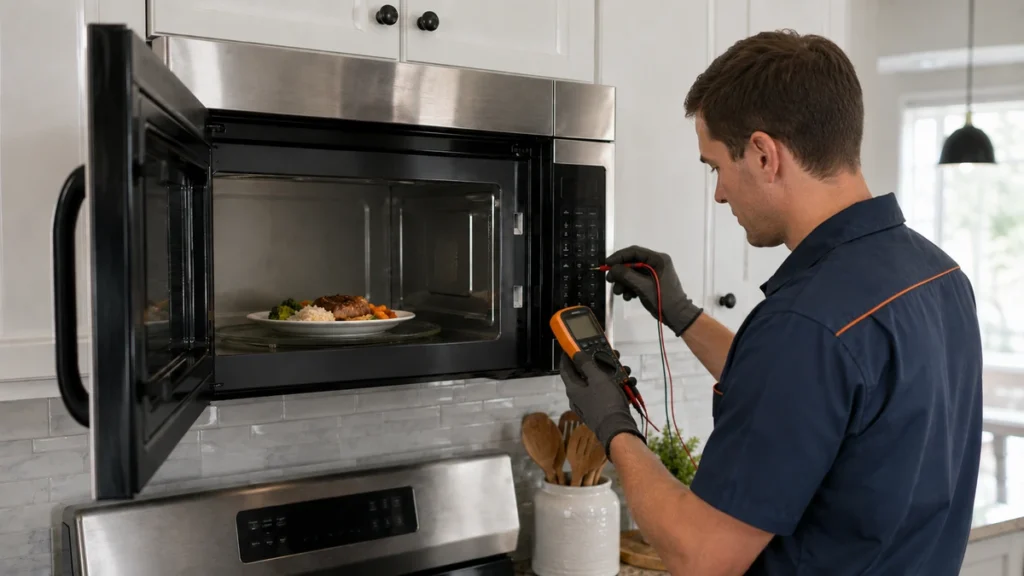
Never remove the microwave’s exterior cover or attempt to test internal electrical components.
Microwave ovens contain high-voltage components. GE Appliances specifically warns that an internal high-voltage capacitor can retain a dangerous electrical charge even after the microwave has been unplugged. Special equipment is normally required to diagnose internal microwave failures safely.
Do not attempt to repair or test:
- The magnetron
- High-voltage capacitor
- High-voltage transformer
- High-voltage diode
- Internal door switches
- Internal fuses
- Control boards
- Exposed wiring
Stop using the microwave immediately if you notice:
- Sparks or arcing
- A burning or electrical smell
- Smoke
- A damaged power cord
- A damaged plug or outlet
- A cracked, bent, or warped door
- Broken hinges, latches, or door seals
- The microwave operating while the door is open
- Repeated circuit-breaker tripping
The FDA recommends not using a microwave if its door does not close firmly or if the door, hinges, latch, or seals are damaged. It also recommends immediately discontinuing use if a microwave continues operating with its door open.
1. Make Sure You Selected a Cooking Cycle
The first thing to check is whether you started an actual microwave cooking cycle.
Many microwaves have a Kitchen Timer that looks and sounds similar to a cooking cycle. The timer may count down and beep, but it does not activate the microwave’s heating system.
Check the control panel for labels such as:
- Kitchen Timer
- Timer
- Cook Time
- Time Cook
- Microwave
- Start
- Add 30 Seconds
Cancel the current program and try again:
- Place a microwave-safe cup containing water inside.
- Close the door firmly.
- Select Cook Time or Time Cook.
- Enter one minute.
- Set the cooking power to 100% or High.
- Press Start.
Do not operate an empty microwave. The FDA advises owners to follow their model’s instructions because some microwave ovens should not be operated while empty.
GE and Samsung both identify accidental use of the Kitchen Timer as a common reason a microwave appears to run without heating.
2. Check for Demo Mode
Demo Mode is one of the most easily overlooked causes of a microwave not heating.
This feature is designed for appliance showrooms. It allows the display, fan, lights, controls, and sometimes the turntable to operate without activating the magnetron that produces microwave energy.
Your microwave may be in Demo Mode when:
- The controls appear to work normally
- The timer counts down
- The fan runs
- The interior light turns on
- The turntable rotates
- The food remains completely cold
- The countdown moves unusually fast on certain models
Whirlpool explains that Demo Mode allows functions to operate without turning on the magnetron. Samsung also identifies Demo Mode as a common reason a microwave runs without warming food.
The procedure for disabling Demo Mode varies by brand and model. Look in the owner’s manual under:
- Demo Mode
- Demonstration Mode
- Showroom Mode
- Options
- Settings
- My Settings
Do not press random combinations of buttons. Locate the model number and follow the instructions written for your exact microwave.
3. Make Sure the Control Lock Is Off
The Control Lock or Child Lock prevents unintended operation of the microwave’s control panel.
Depending on the microwave, an activated lock may display:
- LOC
- L
- LOCK
- A key symbol
- A padlock symbol
- Control Locked
On some models, the display and certain buttons may work while normal cooking functions remain unavailable.
Whirlpool recommends checking the Control Lock when a microwave has power but does not operate normally.
The lock is often disabled by holding a specific button for several seconds, but the required button differs between models. It may be labelled:
- Cancel
- Stop
- Clear
- Control Lock
- Start
- Options
Use the owner’s manual to identify the correct procedure. Avoid repeatedly pressing or holding unrelated controls.
4. Inspect the Microwave Door
The microwave door contains safety-interlock mechanisms that prevent normal microwave operation when the door is open or not properly secured.
Open the door and check for:
- Food residue around the door frame
- Packaging caught near the latch
- A loose or damaged latch
- Bent hinges
- A door that appears uneven
- Cracks around the door
- Damage to the sealing surface
- A door that does not close firmly
Clean accessible food residue with a soft damp cloth and mild detergent. Do not use steel wool, abrasive pads, sharp objects, or excessive force around the latch and seal.
After cleaning, close the door firmly without slamming it.
GE recommends opening and firmly reclosing the door to confirm that its safety mechanisms engage. Samsung also notes that debris around the door or frame can prevent complete closure and interfere with heating.
Do not attempt to bend, adjust, bypass, tape, or manually hold a damaged door switch or latch.
The FDA states that a microwave in good condition should not leak microwave energy. However, a damaged door, hinge, latch, or seal may present a safety concern and should be evaluated by the manufacturer or an appropriate service professional.
5. Check the Power Supply and Reset the Microwave
A microwave may partially operate even when it has experienced a control or power-supply interruption.
Check the following:
- The microwave is plugged securely into its outlet
- The power cord is not damaged
- The outlet is not loose, burned, or discoloured
- The household breaker has not tripped
- The clock and display are functioning normally
- The microwave is not connected through an extension cord
Do not continue using an outlet that feels hot, smells burned, produces sparks, or shows visible damage. Contact an electrician for outlet or household wiring concerns.
You can also perform one simple power reset:
- Cancel the current cooking cycle.
- Unplug a countertop microwave from the wall outlet.
For a built-in or over-the-range unit, switch off its dedicated circuit breaker only when you can identify the correct breaker safely.
- Leave the power disconnected for approximately 30 seconds.
- Restore power.
- Reset the clock if required.
- Test the microwave using the normal Cook Time setting.
GE recommends disconnecting power for approximately 30 seconds when microwave controls are not responding properly.
If the breaker trips again, do not repeatedly reset it. Stop using the microwave and request help from an appropriate appliance professional or electrician.
6. Verify the Power Level and Cooking Settings
A microwave may be producing heat but warming food very slowly because the selected cooking power is too low.
Check whether the display shows:
- Power Level
- PL
- P-10 through P-100
- Defrost
- Melt
- Soften
- Keep Warm
- Sensor
- Low or Medium Power
A defrost or reduced-power setting cycles the microwave’s heating output rather than operating continuously at full power. This can make a functioning microwave appear weak when you are expecting rapid heating.
Cancel the existing setting and select:
- Cook Time
- One minute
- High or 100% power
- Start
Also consider the amount and type of food being heated. Very small portions, frozen food, dense food, and food with low moisture content may heat differently from a cup of water.
Use only cookware identified as microwave-safe. The FDA explains that glass, paper, ceramic, and suitable plastic containers are commonly used because microwaves can pass through them. It also warns that metal cookware and aluminum foil can reflect microwave energy, cause uneven cooking, and potentially damage the oven.
7. Perform a Simple Water-Heating Test
A water test can help determine whether the microwave is producing noticeable heat.
Use this safe procedure:
- Fill a microwave-safe cup with approximately one cup or 250 millilitres of cool water.
- Place the cup in the centre of the turntable.
- Close the door firmly.
- Select Cook Time.
- Set the microwave to High or 100% power.
- Heat the water for one minute.
- Carefully check whether the water has become noticeably warmer.
Whirlpool recommends a similar one-cup, one-minute test when checking whether a microwave is heating.
Use caution when handling the cup because it may become hot from the water. Do not place a thermometer, metal utensil, foil, or other metal object in the microwave.
Do not repeatedly test the microwave when it produces no heat, unusual smells, loud buzzing, sparks, or electrical symptoms.
If the microwave completes the cycle but the water remains cold, an internal heating component may have failed.
8. Check the Turntable, Food Placement, and Installation Clearance
A turntable problem normally causes uneven heating rather than a complete absence of heat. However, it can still make microwave performance appear poor.
Check whether:
- The glass tray is seated correctly
- The turntable coupler is aligned
- The roller ring is positioned properly
- Food residue is blocking the rollers
- The turntable setting has been switched off
- The container is too large to rotate
- The food is placed off-centre
Remove the glass tray and roller ring only as directed in the owner’s manual. Clean accessible food residue and reinstall the parts correctly.
Samsung notes that a dirty roller track or incorrectly positioned turntable can interfere with rotation and contribute to uneven heating.
For a recently installed over-the-range microwave, confirm that it was installed with the ventilation and clearance requirements listed in its installation manual. Samsung advises checking installation and vent clearance when a microwave has not heated properly since installation.
Do not remove ventilation covers, mounting hardware, or the microwave’s exterior cabinet yourself.
What If the Microwave Heats Slowly but Is Not Completely Cold?
A microwave that heats slowly may have a different problem from one that produces no heat at all.
Possible causes include:
- A reduced power level
- An incorrect cooking mode
- Large or dense food portions
- Frozen food
- Uneven food placement
- A turntable that is not rotating
- An unsuitable container
- Low household voltage
- A weakening internal component
Stir, rotate, or rearrange food when recommended by the cooking instructions. Use a microwave-safe container and verify that the selected power level is appropriate.
If heating performance has gradually become weaker, record approximately how long the microwave now takes compared with its previous performance.
When Should You Request Microwave Repair?
Request professional microwave repair assistance when:
- The microwave runs but produces no heat
- The one-minute water test produces no noticeable temperature change
- The microwave heats only occasionally
- The door does not close or latch correctly
- The microwave sparks or produces smoke
- A burning or electrical smell is present
- The unit makes a loud buzzing, grinding, or popping sound
- The circuit breaker repeatedly trips
- An error code continues after one reset
- The appliance operates while the door is open
- The exterior cabinet, cord, plug, or door is damaged
- The problem continues after checking the controls and settings
Internal heating failures may involve a magnetron, high-voltage diode, capacitor, transformer, door-interlock switch, internal fuse, control board, wiring connection, or another component.
These parts should not be tested or replaced as a homeowner project because microwave ovens contain potentially dangerous high-voltage systems. If the microwave still runs without producing heat after these checks, you can request professional microwave repair assistance instead of attempting to test dangerous high-voltage components yourself.
Repair or Replace: What Should You Consider?
Whether a microwave should be repaired or replaced depends on factors such as:
- The microwave’s age
- Whether it is countertop, built-in, or over-the-range
- The original purchase price
- The estimated repair cost
- The availability of replacement parts
- The condition of the door and cabinet
- Whether other functions are also failing
- The cost of removing and installing a replacement
A relatively inexpensive countertop microwave may be more economical to replace when it has a major internal heating failure.
A built-in or over-the-range microwave may be more practical to diagnose because replacement can involve cabinetry, ventilation, mounting hardware, trim kits, or electrical work.
Do not continue operating a microwave with door damage, electrical symptoms, smoke, sparks, or repeated breaker problems while deciding.
Information to Include in Your Microwave Repair Request
Providing detailed information can make your service request easier to review.
Include:
- The microwave brand
- Model number
- Approximate age
- Countertop, built-in, or over-the-range configuration
- Whether the display works
- Whether the fan operates
- Whether the turntable rotates
- Whether the microwave produces any heat
- Any unusual sound or smell
- Any visible sparks or damage
- Any error code
- Whether the breaker has tripped
- When the problem started
- Which troubleshooting checks you completed
The model-number label is commonly located inside the microwave door opening, along the interior frame, on the back of a countertop model, or behind a control or ventilation area.
How to Help Prevent Microwave Problems
Basic care can help prevent some avoidable microwave concerns:
- Use only microwave-safe cookware
- Keep the cavity and door frame clean
- Wipe spills after the microwave cools
- Avoid slamming the door
- Do not operate the microwave while empty
- Do not place metal utensils inside
- Keep ventilation openings unobstructed
- Follow the manufacturer’s installation requirements
- Avoid using damaged electrical outlets
- Stop using the microwave when sparks, smoke, or burning smells appear
The FDA recommends cleaning the microwave cavity, door edge, and surrounding sealing surfaces using water and mild detergent rather than abrasive materials.
Need Help With a Microwave Not Heating in Tyler, TX?
Tyler Appliance Repair Pro helps homeowners request support for microwave heating failures, power problems, turntable concerns, door issues, control problems, unusual noises, sparks, smells, and error messages.
If your microwave still runs without heating after these safe checks, call Tyler Appliance Repair Pro at 903-522-5939 to request microwave repair assistance in Tyler, TX.
Include your microwave’s brand, model number, installation type, symptoms, and any error code displayed.Tyler Appliance Repair Pro provides information and service-request support for homeowners looking for reliable appliance repair in Tyler, TX. Homeowners can also review the Tyler appliance repair service area to check whether assistance is available in their location. Before requesting service, read our guide explaining why a microwave may stop heating and the safe checks homeowners can perform.
Frequently Asked Questions
Why Is My Microwave Running but Not Heating?
The microwave may be in Demo Mode, the Kitchen Timer may have been selected, the door may not be closing correctly, or the power level may be set too low. If the controls are correct and a cup of water remains cold after a one-minute test, an internal component may require professional diagnosis.
Can I reset a microwave that is not heating?
You can disconnect power for approximately 30 seconds and then test the microwave again using a normal cooking cycle. If it still does not heat, avoid repeatedly resetting it and request service.
How do I know whether my microwave is in Demo Mode?
In Demo Mode, the display, fan, light, timer, and turntable may operate while the microwave produces no heat. Some models also count down more quickly than normal. Use the owner’s manual to find the correct procedure for disabling Demo Mode.
Can a microwave turn on if the door switch is faulty?
A door-latch or interlock problem may prevent normal heating or operation. Do not attempt to bypass or repair a door switch yourself. Stop using the microwave if the door is damaged or if it operates while open.
Why is my microwave heating food slowly?
Slow heating may be caused by a reduced power setting, defrost mode, unsuitable cookware, a large food portion, uneven placement, a turntable problem, low voltage, or a weakening internal component.
Is it safe to repair a microwave myself?
Homeowners can check settings, power, the door, turntable, and visible food debris. They should not remove the exterior cover or test internal components because a microwave capacitor can retain a dangerous high-voltage charge even after the appliance is unplugged.
Should I repair or replace a microwave that does not heat?
The decision depends on the microwave’s age, type, condition, repair cost, and replacement cost. A low-cost countertop model may be more economical to replace, while a built-in or over-the-range microwave may be worth diagnosing.
Who can help with a microwave not heating in Tyler, TX?
Tyler homeowners can call Tyler Appliance Repair Pro at 903-522-5939 or use the website’s service-request form to describe the microwave problem and request assistance.