
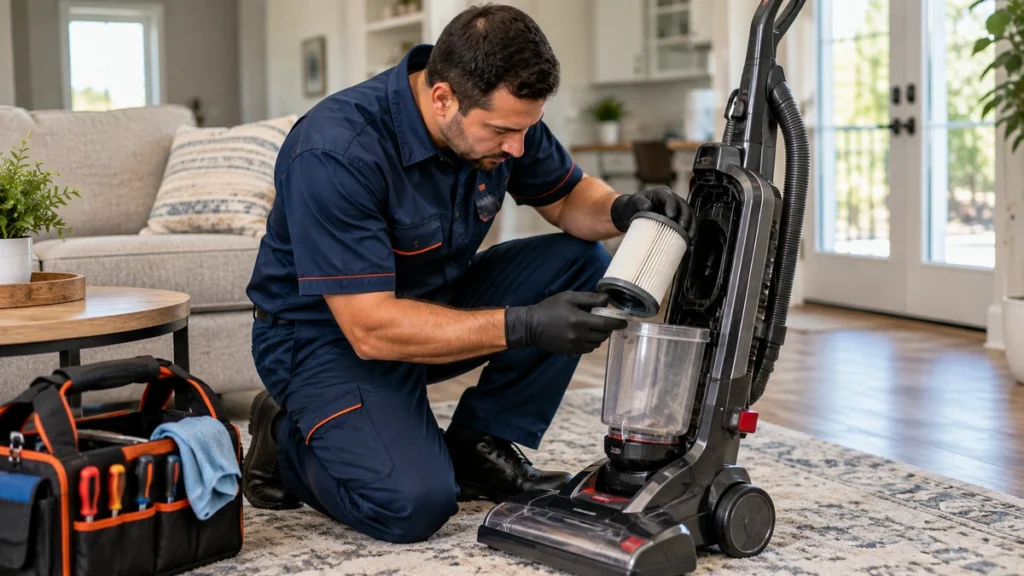
A vacuum losing suction can turn a quick cleaning job into a frustrating one. The machine may still sound normal, but dirt remains on the carpet, crumbs require several passes, or the hose barely picks up lightweight debris.
Fortunately, weak suction does not always mean the vacuum motor has failed. A full dust container, dirty filter, clogged hose, blocked airflow path, loose connection, or incorrect suction setting can reduce cleaning performance significantly.
Before replacing the appliance, Tyler homeowners can make several safe external checks. Always turn off and unplug a corded vacuum before removing filters, hoses, dust containers, or accessible cleaning parts.
Quick Answer: Why Is My Vacuum Losing Suction?
A vacuum losing suction may be caused by:
- A full dust bin or vacuum bag
- Dirty or clogged filters
- A blockage inside the hose or wand
- A cracked or loosely connected hose
- Debris blocking the floor nozzle
- A dirt container or filter cover that is not seated correctly
- An open suction-control vent or low-power setting
- A blocked attachment or restricted airflow path
Start with the simplest checks first. If the vacuum smells burned, sparks, repeatedly shuts off, has a damaged power cord, or shows signs of overheating, stop using it instead of continuing to troubleshoot.
Before Checking a Vacuum With Weak Suction
Unplug the vacuum before inspecting accessible parts.
Do not remove the motor housing, electrical panels, internal wiring, or sealed components. Avoid operating the machine with filters, dirt containers, or protective covers removed unless the manufacturer specifically instructs you to perform a test that way.
Manufacturer troubleshooting commonly points to full dirt containers, dirty filters, hose blockages, poor connections, and restricted airflow as common causes of weak or missing suction. Bissell’s official vacuum no-suction troubleshooting guidance recommends checking the dirt cup, filters, hoses, and airflow path when suction drops.
1. Empty the Dust Bin or Check the Vacuum Bag
The first thing to inspect when a vacuum losing suction problem appears is the dirt container.
For bagless vacuums, check whether the dust bin has reached its MAX line. A container packed with dust, hair, and debris can restrict airflow and reduce pickup performance.
Turn off and unplug the vacuum, then:
- Remove the dirt container
- Empty it into a trash bin
- Remove visible debris around the inlet
- Make sure the container is dry and clean enough to seat correctly
- Reinstall it firmly
For bagged vacuums, check whether the bag is full or improperly installed. Replace it with the correct type when required by the manufacturer.
Do not overfill the bag or bin simply to get more use from it. Some vacuums begin losing airflow before the container appears completely full.
Dyson also recommends emptying applicable vacuum bins when they reach the MAX line as part of troubleshooting suction and blockage problems. Its vacuum support guidance discusses bin levels, filters, blockages, and cleaning performance.
2. Check the Vacuum Filters
Dirty filters are one of the most common reasons for restricted airflow.
Depending on the model, your vacuum may have:
- A pre-motor filter
- A foam filter
- A felt filter
- A post-motor filter
- A HEPA filter
- More than one filter assembly
With the vacuum unplugged, remove only the filters identified as homeowner-accessible in the owner’s manual.
Look for:
- Heavy dust buildup
- Hair
- Fine powder
- Pet dander
- Caked debris
- Filters that appear wet or damaged
Do not assume every vacuum filter is washable.
Some filters can be rinsed, while others must remain dry and be replaced when dirty. Follow the instructions for your exact vacuum model.
Shark’s official upright vacuum maintenance guidance recommends emptying the dust cup, cleaning applicable filters, allowing washable filters to dry completely, and checking for blockages when a vacuum has low or no suction.
Never reinstall a washable filter while it is still damp unless the manufacturer specifically says that is safe. Moisture can interfere with airflow and may damage some vacuum systems.
If your vacuum losing suction problem improves after the filters are cleaned or replaced correctly, restricted airflow was likely contributing to the issue.
3. Inspect the Vacuum Hose for a Blockage
A clog inside the hose can reduce suction dramatically even when the motor sounds completely normal.
With the machine unplugged, disconnect the hose according to the owner’s manual.
Look through the accessible openings for:
- Hair
- Paper
- Tissue
- Pet fur
- Small toys
- Fabric
- Food debris
- Large dust clumps
Pay particular attention to bends in the hose, because debris can become trapped where the hose curves.
If your manufacturer provides a specific method for clearing the hose, follow it carefully. Do not use sharp metal objects that could puncture or damage the hose.
Bissell’s vacuum support information repeatedly identifies hose clogs as a common cause of low or no suction and recommends inspecting the airflow path when suction is reduced.
After clearing an accessible obstruction, reconnect the hose securely before testing the vacuum again.
4. Look for Cracks, Holes, or Loose Hose Connections
A hose does not have to be completely blocked to cause poor suction.
Air escaping through a crack, hole, split, or loose connection can reduce the vacuum pressure available at the cleaning head or attachment.
With the vacuum unplugged, inspect the accessible hose from end to end.
Look for:
- Visible cracks
- Small holes
- Torn flexible sections
- Loose hose cuffs
- Connections that do not lock into place
- Damage around bends
- Separated fittings
Bissell’s official no-suction troubleshooting also recommends inspecting hoses for cracks or damage when airflow is weak.
Do not use temporary tape repairs as a long-term solution when the manufacturer calls for replacement of a damaged hose.
Reconnect every fitting firmly. A hose that looks normal but is not fully seated can sometimes create enough of an air leak to noticeably reduce suction.
5. Check the Floor Nozzle and Accessible Air Path
The hose may be clear while the lower airflow path remains blocked.
Turn off and unplug the vacuum, then inspect the floor nozzle and other accessible openings identified in the owner’s manual.
Common debris includes:
- Hair
- Carpet fibers
- Threads
- Pet fur
- Paper
- Large crumbs
- Small objects
Do not remove covers, belts, electrical components, or motorized parts unless your manufacturer specifically identifies them as normal maintenance items.
This article is focused on suction, so if the airflow at the hose is strong but cleaning performance at the floor head remains poor, the problem may belong to a different part of the vacuum system.
A future guide can deal specifically with a vacuum brush roll not spinning rather than mixing that separate problem into this article.
6. Make Sure the Dirt Container and Filter Covers Are Seated Correctly
Vacuum systems rely on sealed airflow.
If the dust bin, bag compartment, filter cover, or hose connection is not installed correctly, air may enter where it should not and reduce suction at the cleaning end.
After checking filters and emptying the bin, confirm that:
- The dust container clicks or locks into place
- The filter is installed in the correct orientation
- Filter covers close completely
- The bag compartment door is fully latched
- Hose connections are secure
- No seal is visibly folded or displaced
Bissell notes that an incorrectly seated dirt container or unlatched compartment can interfere with the seal and contribute to suction loss on some models.
Do not force a cover or container that will not close. Remove it, check the installation position, and follow the manufacturer’s assembly instructions.
A vacuum losing suction immediately after filter cleaning or bin emptying may simply have a component that was not reinstalled correctly.
7. Check the Suction Control or Power Mode
Some vacuums allow the user to intentionally reduce suction.
Depending on the model, you may find:
- A suction-control slider
- An airflow vent on the handle
- A MIN/MAX control
- Eco or low-power mode
- Different power settings for rugs and hard floors
If the vacuum suddenly seems weak, make sure a suction-control vent has not been left open accidentally.
For vacuums with adjustable power modes, select the setting recommended for the surface you are cleaning.
Bissell’s support documentation notes that some models can have reduced suction when the variable suction control is set to minimum or when an airflow-control opening is not in the maximum-suction position.
Do not assume the highest setting is appropriate for every surface. Follow the manufacturer’s recommendations, especially for delicate rugs and lightweight materials.
8. Check Attachments and Compare Where Suction Is Strongest
A useful final check is to determine whether suction is weak everywhere or only through a particular attachment.
With the vacuum assembled according to the manufacturer’s instructions, compare normal performance at different accessible points.
For example, you may notice:
- Good suction at the hose but poor pickup through an attachment
- Weak suction through both the hose and floor nozzle
- Good airflow until a particular tool is connected
- Better suction after an attachment is removed
If suction becomes weak only when a particular attachment is installed, check that attachment for visible debris or blockage.
Bissell’s troubleshooting guidance similarly recommends comparing suction at different points in the airflow path to help identify where a restriction may be located.
Do not perform tests that require operating the vacuum with electrical covers or safety components removed.
What If the Vacuum Has Suction at the Hose but Does Not Pick Up Dirt From the Floor?
This symptom helps narrow down the problem.
If suction at the hose feels normal but floor pickup remains poor, check the accessible nozzle and lower airflow path for debris.
The issue may involve:
- A blocked lower air channel
- Debris around the floor nozzle
- An attachment problem
- A brush-system problem
- A connection between the nozzle and airflow path
Avoid turning this into a full brush-roll repair at home.
A brush that does not rotate is a separate troubleshooting topic and may involve hair buildup, a belt, a motorized head, electrical connections, or another component depending on the model.
What If the Vacuum Suddenly Lost Suction?
Sudden suction loss often points to something that changed recently.
Think about whether the vacuum:
- Picked up a large object
- Was used on heavy pet hair
- Collected fine powder
- Reached the dirt-bin MAX line
- Had its filter recently cleaned or replaced
- Had its hose disconnected
- Was reassembled after maintenance
A newly developed blockage, improperly seated component, or restricted filter can sometimes explain why performance changed from one cleaning session to the next.
If the vacuum losing suction problem remains after checking the normal airflow path, further diagnosis may be necessary.
When Should a Vacuum With Weak Suction Be Professionally Checked?
Consider stopping troubleshooting when:
- Suction remains very weak after the bin, bag, filters, and hose are checked
- The vacuum makes a new grinding or abnormal motor noise
- There is a burning or electrical smell
- The power cord or plug is damaged
- The machine repeatedly overheats or shuts off
- A hose or housing component is cracked
- Suction disappears at the main vacuum intake
- The appliance blows excessive dust back into the room
- The problem continues after manufacturer-approved maintenance
If the problem cannot be identified through safe external checks, you can review the available help for vacuum and carpet cleaner problems instead of opening the motor housing yourself.
Information to Include in Your Vacuum Service Request
Providing useful details can make the issue easier to review.
Include:
- Vacuum brand
- Model number
- Approximate age
- Upright, canister, stick, or other design
- Bagged or bagless configuration
- Whether suction is weak at the hose, floor head, or both
- Whether the filters were recently cleaned
- Whether you found a blockage
- Whether the hose has visible damage
- Any unusual noise or smell
- Whether the vacuum shuts off during use
- When the suction problem started
You can submit an online service request with these details.
How to Help Prevent Vacuum Suction Problems
Routine maintenance can help preserve airflow and cleaning performance.
Useful habits include:
- Empty the dirt container before it becomes overfilled
- Replace vacuum bags at the recommended interval
- Check filters regularly
- Wash only filters the manufacturer identifies as washable
- Allow washable filters to dry completely before installation
- Check hoses periodically for debris
- Remove visible clogs promptly
- Make sure dirt containers and covers lock securely
- Inspect accessible hose connections
- Use the correct suction or power setting
- Follow the maintenance schedule in the owner’s manual
Shark recommends regular dust-cup emptying, filter maintenance, and blockage checks as part of upright-vacuum care.
Need Help With a Vacuum Losing Suction in Tyler, TX?
If your vacuum losing suction problem continues after these eight checks, avoid dismantling the motor housing or electrical system.
Tyler Appliance Repair Pro accepts service requests for vacuum suction, hose, airflow, brush, power, and cleaning-performance concerns. You can request service online and include the vacuum brand, model number, where the suction feels weakest, and the troubleshooting steps you have already completed.
You can also view the areas we serve or call Tyler Appliance Repair Pro at 903-522-5939 to describe the problem.
Frequently Asked Questions
Why is my vacuum losing suction even after I empty it?
A full bin is only one possible cause. Dirty filters, a clogged hose, a blocked nozzle, loose connections, damaged hoses, or an incorrectly seated dirt container can also reduce airflow.
Can a dirty vacuum filter reduce suction?
Yes. Dirt and fine debris can restrict airflow through a filter. Clean or replace the filter only according to the manufacturer’s instructions, because not every vacuum filter is washable.
How do I know if my vacuum hose is clogged?
Weak suction through the hose, a sudden change in performance, or visible debris inside an accessible opening may indicate a blockage. Turn off and unplug the vacuum before inspecting or removing the hose.
Can a cracked vacuum hose cause weak suction?
Yes. A crack or hole can allow outside air into the airflow system and reduce suction at the cleaning end. Inspect the hose and connections for visible damage.
Why does my vacuum have good hose suction but poor floor pickup?
The lower airflow path, floor nozzle, or cleaning-head system may be obstructed or malfunctioning. Check only the accessible areas specified by the manufacturer.
Should vacuum filters be washed?
Only when the manufacturer identifies them as washable. Some filters can be rinsed and fully air-dried, while others should remain dry and be replaced when dirty.
Can an incorrectly installed dust bin reduce suction?
Yes. If the dirt container, bag door, filter cover, or hose is not seated correctly, the airflow system may not seal properly and suction can decrease.
When should I stop using a vacuum with low suction?
Stop using it if you notice a burning smell, smoke, sparking, a damaged cord, repeated overheating, unusual motor noise, or another electrical symptom.